
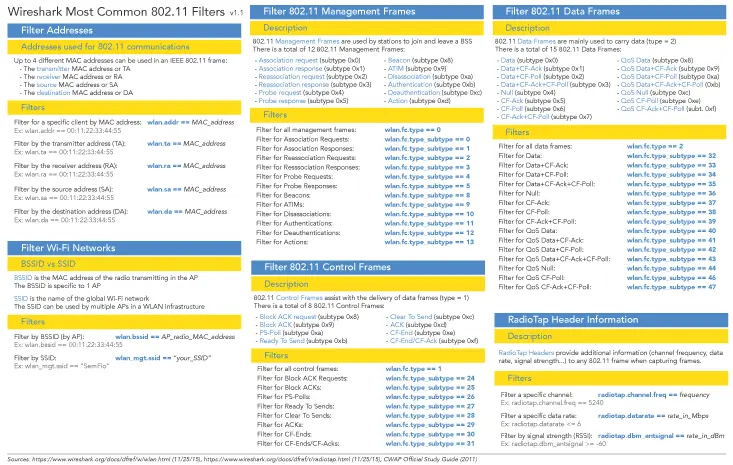

I often use Wireshark as my go to packet analyzer. I like it but I feel like I always forget what the display filters are. So I always find myself searching them online over and over again. So I have decided to create a reference sheet I could store and share on the blog.
Feel free to download and use the reference sheet as much as you want. I have voluntarily left some blank spaces so we can make it better all together. So don't hesitate to share your feedbacks with me.
Click on the image to open the PDF version:
Download the Wireshark 802.11 filters reference sheet (PDF, 0.1 MB)
*Bonus* Quick Wireshark Tips
To wrap up this article, I might as well share with you some tips I use on "my Wireshark":
- Use of colours: I added the Metageek Eye P.A. colours to my Wireshark. It helps breaking apart 802.11 frames. Follow this link to do it on yours: Metageek Eye P.A. colours in Wireshark
- Use of additional columns: I added some 802.11 related columns to the default setup including "Signal Strength", "Data Rate", "Channel Used" and "MCS Index")
Here is how it looks: